


Face, Body Editor - Retouch Me
3.9194.00 Reviews
App Specs
- Version
- 8.30
- Updated On
- License
- Free
- Downloads
- 1,000,000+
- Developer
- GOOD RETOUCH LP
- Categories
- Photography
- Platform
- Android
Screenshots
 Analysis by AppCompare
When I consider a photo editor, I care about more than whether it can smooth a selfie: I want to know what choices I’m making when I send a personal image through an editing workflow. Face, Body Editor - Retouch Me is a photography app from GOOD RETOUCH LP, built around appearance-focused changes. That makes it useful for specific touch-ups, but it also makes a little care worthwhile: a face or family picture can feel more personal than an ordinary image adjustment.
What the app is for—and what to weigh first
The basic appeal is easy to understand. You can work on a portrait or body photo rather than learning a full desktop editing suite, and the app’s focus is on altering how a person looks in an image. It is free to install, rated for Everyone, and has an average rating of 4.0 from around 2.9 thousand ratings. That gives a newcomer a sense of its reach, but it doesn’t tell you whether a particular paid edit or result will suit your taste.
I’d treat the free download as a chance to explore, not as a promise that every tool or service will be free. In-app purchases range from $0.99 to $99.99 per item, so I would check the cost shown for the specific option before confirming anything. If you only want a quick, occasional correction, that distinction matters: a tool you can try without charge and a paid service are different decisions.
Trust begins with the choices you can see
The app’s store description positions it around body shaping, face retouching, and removing photo blemishes. That tells me what kind of edits it is intended to support, but it is not enough on its own to judge how an image is handled behind the scenes. I wouldn’t infer privacy practices, permissions, or data retention from a feature summary. For anything involving a sensitive portrait, I’d read the current permission prompts and privacy information shown in the app and its store before choosing a workflow.
There is a practical difference between adjusting an image on your device and submitting it for a service that involves another party. The published article describes professional edits, but I would make that choice only after checking the request screen and any explanation presented at the point of submission. I’d also avoid including extra people or revealing details in the frame when they aren’t needed for the edit. A tighter crop can reduce what you share and often makes the requested change easier to judge.
Keep control of the edit
My preferred approach with appearance editing is to start small and keep an untouched copy of the original. That gives me a clear comparison and an easy way back if the result feels unlike the person in the photo. I’d check edges around hair, clothing, and the background after any body adjustment, because subtle distortions can be more noticeable there than in the edited area itself.
It also helps to decide what “better” means before opening the editor. Removing a temporary blemish for a profile picture is a different goal from changing someone’s proportions. For a photo shared with friends or family, I’d lean toward modest corrections; for a deliberately stylized image, stronger changes may fit. Either way, I want the final choice to remain mine rather than treating an app’s suggested look as the default.
Worth Reading Before You Choose

EA SPORTS FC Mobile 26 Is a Bigger Football Game, but It Takes Time

Flipboard Shows What News Apps Must Do Beyond the Feed

Switching to Android Auto Means Rethinking Your Driving Routine

Google Calendar Makes a Crowded Week Easier to Manage

Ludo King Makes the Most of the Minutes Between Plans

Baby Panda World Brings Quick Play to Modern Phones, but Its Game Library Feels Busy
Getting Started with Retouch Me
First things first, let’s talk about the installation. Jumping into Retouch Me is as easy as pie. A quick download from the App Store or Google Play, and you’re all set to start editing. The interface is super intuitive, which I love because, let’s be honest, nobody has time to read a manual these days.
The Android version is currently 8.04 and requires Android 8.0 or later. It launched on November 14, 2023, and has passed one million installs. Those figures suggest it is an established option rather than an obscure experiment, though they don’t replace trying the interface on your own phone. I’d check the device requirement before installing, especially if you’re using an older Android device.
Once you fire up the app, you’re greeted with a clean and straightforward layout. Everything is neatly organized, making it a breeze to navigate. You’ve got your photo albums right there, ready to import any picture you want to work on. The app supports high-resolution images, which is a big plus for those of us who are a bit picky about picture quality.
Features That Wow
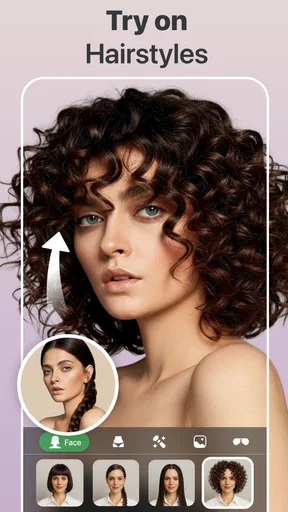
Now, let’s dive into what makes this app stand out. The range of editing tools is impressive. From basic adjustments like brightness and contrast to more advanced features like reshaping and slimming, this app has it all. What sets it apart, though, is the ability to outsource edits to professional designers. Yep, you heard that right!
Here’s a quick rundown of the standout features:
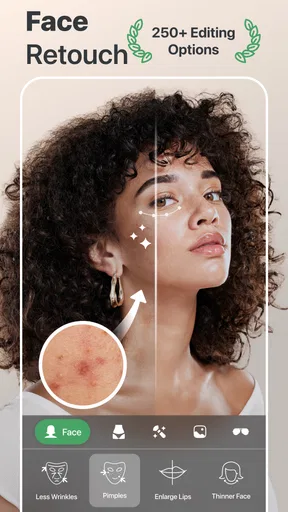
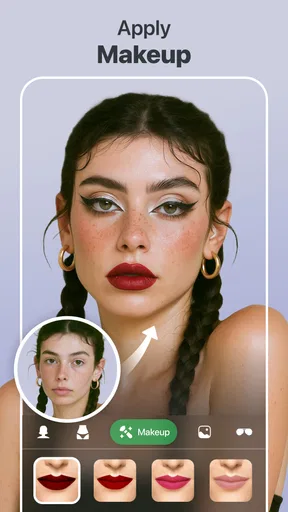
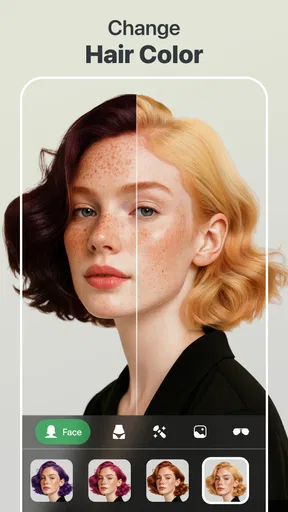
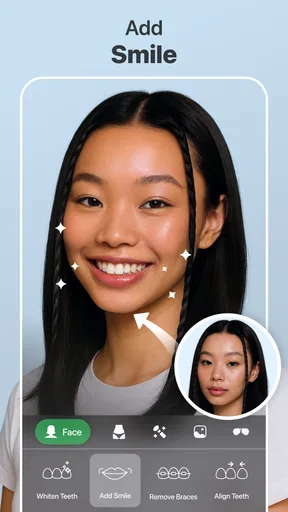
- Face Retouching: Smooth out skin, whiten teeth, and even add makeup with a few taps.
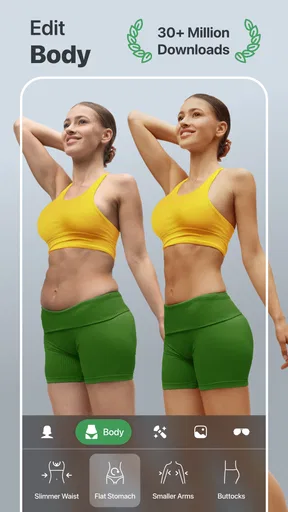
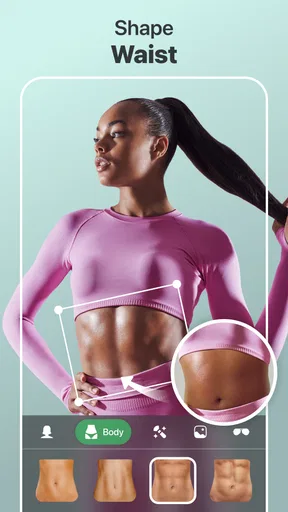
- Body Reshaping: Want to look a bit taller or slim down? The app’s got your back.
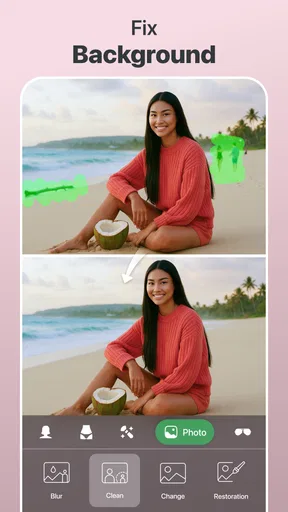
- Background Changes: Swap out that boring backdrop for something more exciting.
- Professional Services: Send your photos to a team of designers for premium edits.
The professional touch is a game-changer. You submit your photo, specify what you want, and voila! In a little while, your photo comes back looking like it just stepped out of a magazine.
Choosing the right kind of edit
The useful question isn’t how many sliders an editor has; it’s whether its particular approach matches the job. Retouch Me is aimed at visible changes to faces and bodies, so I’d reach for it when I have a clear, narrow request—such as toning down a distracting blemish or making a small adjustment to a portrait. For color grading, layered composites, selective lighting, or precise control over every pixel, a general-purpose photo editor is usually a better fit.
That distinction can save time. If a picture only needs a crop, exposure correction, or a warmer color balance, the built-in editor on a phone may be enough and avoids an appearance-focused workflow altogether. If I want a more polished portrait but still want to do the work myself, a conventional retouching app gives me more direct control. I’d choose this app when its focused tools or designer-assisted option solve a specific problem I can describe clearly.
A realistic workflow for a shared photo
Imagine I’ve taken a group picture at a family gathering and notice a small temporary blemish in my own face. I’d first select the least revealing version of the photo that still gives the editor enough detail, then decide whether a light correction is all I need. Before paying for anything, I’d inspect the available options and their displayed cost. After editing, I’d compare the result with the original at normal viewing size, not just zoomed in, and check that nearby skin and edges still look believable.
If the image includes relatives who haven’t asked for edits, I’d avoid reshaping their appearance or sending the picture for a service without considering their wishes. And if I’m preparing a photo for a work profile or an official purpose, I’d keep the changes restrained. A polished image can be helpful; a heavily altered one may create expectations that the photo isn’t meant to represent.
My Experience
So, what’s it like using this app? Honestly, it’s kind of addictive. I started with a simple selfie, just to test the waters. A little teeth whitening here, a touch of skin smoothing there, and I was hooked. The app’s tools are precise, and the results are surprisingly natural.
For a more dramatic test, I tried out the body reshaping features. I was a bit skeptical at first, but the app did a fantastic job of making adjustments without warping the entire image. It’s subtle enough to look real, which is exactly what you want.
And let’s not forget about the professional edits. I sent off a family photo for a little touch-up, and when it came back, I was blown away. The designers really know their stuff, making the photo look polished and vibrant without going overboard.
Where I’d be cautious
Appearance tools can produce a result that looks convincing at first glance but feels wrong when compared with the original. I’d watch for changes to proportions that affect the setting around a person—straight lines, door frames, or other visible background details are useful reference points. If those shift, I’d undo or reduce the change rather than trying to hide the distortion with more editing.
Another trade-off is the difference between an automated adjustment and a designer-assisted one. The latter may be appealing when a request is difficult to handle yourself, but it involves a more deliberate submission and may cost extra. I’d reserve that route for a photo where the improvement matters enough to justify the expense, rather than sending every casual snapshot for polish.
Room for Improvement?
While I’m a fan of Retouch Me, it’s not without its quirks. Some features are locked behind paywalls, which can be a bit frustrating if you’re on a tight budget. However, the free tools are still quite robust, so it’s not a deal-breaker.
Another thing to note is that the app can be a bit heavy on resources, especially if you’re using an older device. It didn’t crash on me, but it did slow down occasionally during more intensive edits.
The focused design also means it isn’t the editor I’d open for every photo. Someone who wants detailed manual controls, a broad set of creative effects, or a purely local workflow should compare other options before settling on it. The app’s appeal is strongest when a face- or body-focused correction is genuinely the task, not when I’m trying to replace a complete photography toolkit.
Who I’d recommend it to
I’d suggest trying it if you regularly make portraits, want a simple way to refine a selfie, or prefer requesting a specific touch-up rather than learning a more technical editor. It may also suit someone who edits only now and then and values a focused interface over a long list of general photography controls. The Everyone age rating describes its content classification; it doesn’t mean every kind of appearance editing will be right for every user.
I’d skip it if you’re uncomfortable sharing a personal image for a service, if you need extensive manual control, or if you want a no-cost workflow with no paid choices to consider. I’d also think twice before using body reshaping for images where accuracy matters more than presentation. For those cases, a basic crop and light correction—or no edit at all—can be the better choice.
Final Thoughts
All in all, Face, Body Editor - Retouch Me is a fantastic app for anyone looking to enhance their photos with ease. Whether you’re a selfie aficionado or just want to polish up some family pictures, it’s a handy tool to have in your pocket. The user-friendly interface, combined with powerful features and professional editing services, makes it a standout in the crowded world of photo editing apps.
So, if you’re ready to take your photos to the next level, give Retouch Me a whirl. Trust me, you won’t be disappointed!
My more measured advice is to begin with one ordinary photo and one modest edit, then judge the result beside the original before deciding whether the app belongs in your routine. Check the price at the point you choose a paid option, and make an informed choice before submitting an image for professional work. Those small habits let you benefit from focused portrait tools without handing over more money, control, or personal detail than you intended.
Pros
- Easy-to-use interface for editing.
- Wide range of retouching tools.
- Supports high-resolution images.
- Quick processing time for edits.
- Allows sharing directly to social media.
Cons
- In-app purchases can add up quickly.
- Some features require internet access.
- Occasional ads can be intrusive.
- Limited free editing options.
- Minor bugs in older devices.
FAQs for Face, Body Editor - Retouch Me
What features does Face, Body Editor - Retouch Me offer?
Face, Body Editor - Retouch Me provides a comprehensive suite for photo editing, allowing users to retouch facial features, adjust body proportions, and enhance overall appearance. The app includes tools for smoothing skin, reshaping body parts, whitening teeth, and applying makeup effects, ensuring a professional-grade finish to your photos.
Is Face, Body Editor - Retouch Me easy to use for beginners?
Yes, Face, Body Editor - Retouch Me is designed with user-friendliness in mind. The app features an intuitive interface, making it accessible for beginners. It offers guided tutorials and a help section for users unfamiliar with photo editing, ensuring a seamless experience even if you're new to such tools.
Does Face, Body Editor - Retouch Me require an internet connection?
Most features of Face, Body Editor - Retouch Me can be used offline, allowing users to edit photos without an internet connection. However, some advanced features or updates might require online access. It's recommended to have an internet connection for downloading additional resources or accessing community features.
Are there any privacy concerns with using Face, Body Editor - Retouch Me?
The app takes user privacy seriously, employing encryption to protect personal data and edited photos. It does not share your photos without permission. Users should review the app's privacy policy to understand data handling practices fully, ensuring their comfort with the app's operations.
Is Face, Body Editor - Retouch Me free to use, or does it have in-app purchases?
Face, Body Editor - Retouch Me offers a free version with basic editing features. However, to unlock premium tools and advanced options, users may opt for in-app purchases or a subscription plan. This model allows users to choose based on their editing needs and budget preferences.


